But there is no single universal “AI crawler.” Different systems use the web for different purposes. For example:
- Googlebot crawls content for Google Search and feeds the Search index that Google’s AI features can retrieve from.
- OAI-SearchBot supports discovery for ChatGPT Search.
- GPTBot is associated with potential OpenAI model-training use.
- Google-Extended is a publisher control for specified Gemini-related uses and does not control normal Google Search crawling.
- User-triggered agents can visit websites on behalf of a person and may need to understand buttons, forms, menus, and other interactive elements.
OpenAI says publishers that want content discovered and cited in ChatGPT Search should allow OAI-SearchBot. Google says its generative Search systems continue to rely on its normal Search index and core ranking systems.
The practical rule is: do not optimize for “AI crawlers” as one category. Identify which systems you want to support, understand what each one does, and configure access intentionally.
What Is an AI Crawler?
An AI crawler is an automated system that requests webpages or other web resources for an AI-related purpose. That definition is deliberately broad. The important part is purpose.
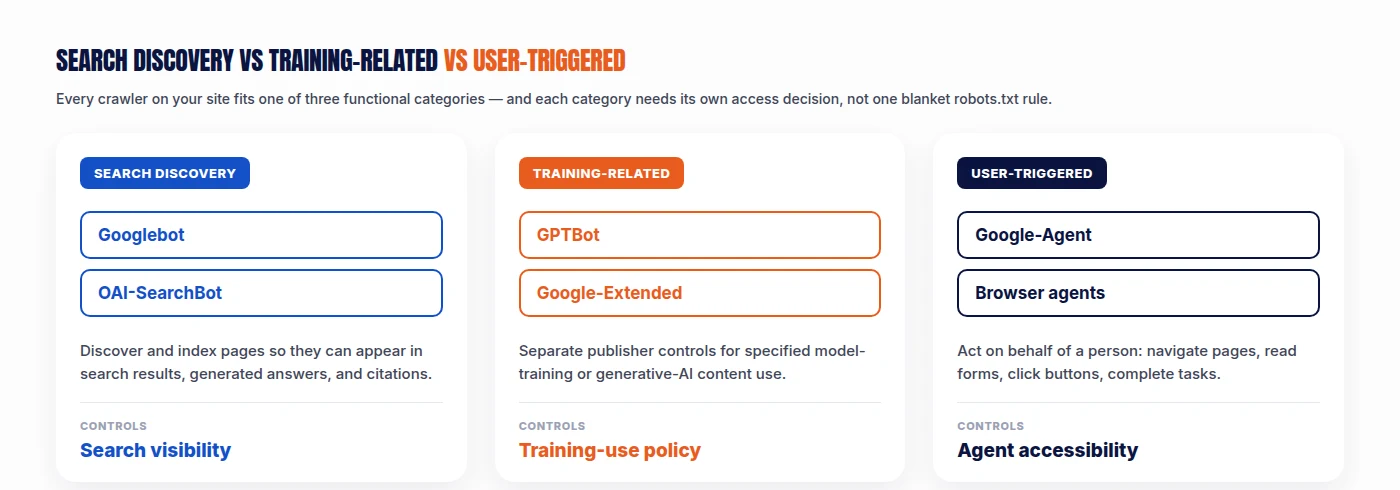
Two bots can request the same URL while doing completely different jobs. One may be gathering information for search. Another may be involved in model-training-related data collection. A third may be acting directly on behalf of a user. Calling all three “AI crawlers” hides the technical differences that actually matter.
A better classification is:
1. Search and Discovery Crawlers
These systems help discover information that may later appear in search results, generated answers, citations, or links. Examples include Googlebot and OAI-SearchBot.
2. Training-Related Crawlers or Controls
These concern whether content may be used for specified model-training or related AI uses. Examples include GPTBot and Google-Extended.
3. User-Triggered Agents and Fetchers
These visit or interact with websites because a user asked an AI system to complete a task. Examples include systems that compare products, navigate pages, read forms, select options, and carry out actions.
This distinction should be the starting point for every AI crawler policy.
How an AI Crawler Reaches Your Website
Before a crawler can understand your content, it has to survive several technical layers. A simplified request path looks like this:
Crawler → DNS → CDN / reverse proxy → Firewall / WAF / bot management → robots.txt → Web server → HTTP response → HTML and resources → Rendering → Content extraction → Machine interpretation
A failure at any layer can stop the process. This is why changing one robots.txt rule does not automatically make a site “AI crawlable.” The crawler may still be blocked before it ever reaches the page.
Step 1: DNS and Network Access
The crawler first needs to resolve the domain and reach the server infrastructure. Potential failures include DNS errors, connection timeouts, TLS problems, network filtering, and IP blocks.
These issues usually affect ordinary search crawlers and AI crawlers alike. If your website is unstable at the network level, AI optimization should not be the first concern. Fix the infrastructure.
Step 2: CDN, Firewall, and Bot Protection
Many sites use Cloudflare, Akamai, AWS WAF, WordPress security plugins, or enterprise bot-management systems. These can protect a site from scraping, abuse, credential attacks, and DDoS traffic. They can also block legitimate crawlers.
OpenAI specifically warns that web-protection systems can mistake OpenAI crawlers for unwanted automated traffic and return responses such as 403 Forbidden unless crawler traffic is properly permitted.
This creates a common Technical GEO failure: robots.txt says Allow, but the firewall says No. That means a crawler policy should never be audited through robots.txt alone.
Step 3: The Crawler Checks robots.txt
Compliant crawlers usually evaluate your site’s crawler rules before requesting blocked resources. For a typical site, robots.txt is located at https://example.com/robots.txt.
Google’s crawlers download and parse this file before crawling applicable URLs, following the Robots Exclusion Protocol. A simple robots.txt example might look like:
User-agent: *
Disallow:

Sitemap: https://example.com/sitemap.xml
This broadly permits crawling. But AI-related policies often require more specific decisions. For example:
User-agent: OAI-SearchBot
Allow: /

User-agent: GPTBot
Disallow: /
This could represent a publisher that wants ChatGPT Search discovery while opting out of GPTBot-related potential training use. OpenAI explicitly separates those controls.
robots.txt Controls Crawling, Not Everything
One of the most important technical distinctions is: robots.txt controls crawling. It does not automatically control every kind of indexing, search appearance, or downstream use.
For Google, a URL blocked by robots.txt can sometimes still be known and indexed based on external signals, although Google cannot crawl the page content normally. Google’s documentation explicitly notes that blocked URLs may still appear without a snippet in some circumstances.
OpenAI provides a related warning. If OpenAI learns about a disallowed URL from another source and believes it is relevant, it may surface the URL and title in certain contexts. OpenAI says publishers who do not want this should use noindex, while ensuring the crawler can access the page in order to read that directive.
The lesson is: crawl control and indexing/display control are not identical.
OAI-SearchBot vs GPTBot
OpenAI currently separates these functions.
OAI-SearchBot
OAI-SearchBot supports ChatGPT Search discovery. OpenAI says publishers who want content included in ChatGPT summaries and snippets should make sure OAI-SearchBot is not blocked. If your goal is “I want my site to be discoverable and cited in ChatGPT Search,” then OAI-SearchBot is relevant.
GPTBot
GPTBot concerns potential model-training use. OpenAI says publishers that want pages excluded from potential training should disallow GPTBot.
That means these are valid separate policy questions: should ChatGPT Search discover my pages, and should GPTBot have access for potential training-related use? Do not collapse those into one switch.
Googlebot vs Google-Extended
Google has a similar conceptual separation.
Googlebot
Googlebot is part of Google’s normal crawling infrastructure. Google’s generative Search features, including AI experiences, retrieve relevant pages from the Google Search index using systems such as RAG and query fan-out. That means normal Google Search crawling remains foundational.
Google-Extended
Google-Extended is a separate publisher control related to specified Gemini and generative AI uses. It is not simply “Google’s AI crawler” in the same sense as Googlebot. Google has repeatedly clarified that Google-Extended does not control ordinary Google Search inclusion. So blocking Google-Extended should not be treated as equivalent to blocking Googlebot.
AI Crawler Policy Matrix
A practical crawler policy can be documented like this:
| System | Primary Role | Search Discovery | Training-Related | User Interaction | Typical Decision |
|---|---|---|---|---|---|
| Googlebot | Google Search crawling | Yes | Not the same control | No | Usually allow for SEO |
| OAI-SearchBot | ChatGPT Search discovery | Yes | No | No | Allow if ChatGPT visibility is desired |
| GPTBot | OpenAI training-related access | No direct Search requirement | Yes | No | Business-policy decision |
| Google-Extended | Google AI-use control | Does not control normal Search | Yes / specified uses | No | Business-policy decision |
| Google-Agent | User-triggered Google agent | No conventional indexing role | No | Yes | Depends on agent strategy |
Google now documents Google-Agent as a user-triggered system used by agents hosted on Google infrastructure to navigate the web and perform actions at a user’s request. This reinforces the point: crawler governance is becoming multidimensional.
How Search Crawlers Discover URLs
Before a crawler fetches a page, it needs to know the URL exists. Common discovery mechanisms include internal links, XML sitemaps, previously crawled pages, external links, feeds, and platform-specific discovery systems.
For traditional SEO and Technical GEO, internal architecture remains critical. A page that is not linked internally, missing from useful navigation, or absent from logical hubs may be much harder to discover consistently. This is why AI crawler optimization should still include standard technical SEO — see Technical SEO vs Technical GEO: What’s Different? for how the two disciplines overlap and diverge. AI search does not make orphan pages a good idea.
What Happens After the Crawler Fetches the URL?
The server returns an HTTP response. Common status codes include:
- 200 — OK. The page was successfully returned. This is normally what you want for live canonical content.
- 301 / 308 — Permanent Redirect. The URL permanently points elsewhere. Useful when URLs have moved.
- 302 / 307 — Temporary Redirect. Used for temporary moves.
- 404 — Not Found. The resource does not exist.
- 403 — Forbidden. Access is denied. This is a common problem when bot-management systems block legitimate crawlers.
- 429 — Too Many Requests. The crawler has been rate-limited.
- 5xx — Server Error. The server could not fulfill the request.
For AI crawler optimization, you should not only ask “can I open this page in my browser?” Ask: “what response does the target crawler receive?” Those are not always the same.
Why HTTP 200 Matters More Than AI Markup
There is a recurring pattern in GEO discussions: people worry about llms.txt, special AI schema, special content blocks, and “AI-ready” metadata, while the site returns 403 errors to the crawler. That is backwards.
The optimization hierarchy should be:
Server access → Correct HTTP response → Crawler permission → Index/retrieval eligibility → Rendering → Machine understanding
Only after these work should you worry about marginal enhancements. A fancy AI-specific file cannot compensate for a crawler that cannot fetch the page.
How AI Crawlers Process HTML
Once HTML is fetched, systems can inspect page content and structure. Useful signals can include <title>, headings, paragraphs, links, lists, tables, metadata, structured data, and semantic elements.
This does not mean AI systems simply read the webpage from top to bottom like a person. Search and retrieval pipelines may extract, index, or evaluate different portions of content. The practical optimization principle is: make important information explicit and structurally clear.
For example:
Bad: “We make modern business transformation effortless.”
Better: “Acme provides appointment-booking software for dental clinics.”
The second sentence clearly communicates entity, product category, and target customer. Machine clarity and human clarity often reinforce each other.
How JavaScript Changes Crawling
Modern websites often deliver only part of their content in the initial HTML. JavaScript then requests data, renders components, inserts text, builds navigation, and changes interface states.
Google can render JavaScript, but JavaScript adds technical complexity. A crawler may need to fetch the initial HTML, discover resources, execute JavaScript, wait for rendering, and process the resulting DOM. If something fails during that process, important information may disappear. Typical problems include blocked JS files, API errors, hydration failures, client-side routing errors, delayed content, and unsupported interactions.
The practical rule is not “never use JavaScript.” It is: do not make essential information unnecessarily dependent on fragile JavaScript execution.
Raw HTML vs Rendered DOM
These are not always the same. Suppose the initial HTML contains:
<div id="price"></div>JavaScript later changes it to:
<div id="price">$99/month</div>If a system only sees the original source, the price is missing. If it renders successfully, the price exists. This is why technical audits should compare raw source with rendered DOM for important templates. Especially inspect ecommerce product pages, SaaS pricing, location pages, dynamic FAQs, and comparison tools.
Can AI Crawlers Understand Structured Data?
Structured data can make certain information more explicit. For example:
<script type="application/ld+json">
{
  "@context": "https://schema.org",
  "@type": "Organization",
  "name": "Example Company"
}
</script>
This clearly states that the entity is an organization. Useful structured data can include Organization, Product, LocalBusiness, Person, Article, and BreadcrumbList.
But structured data should not be treated as a magic AI layer. Google says no special AI schema is required for its generative Search experiences. Its guidance remains to use appropriate structured data that matches visible page content. So: use structured data to clarify reality. Do not use it to invent signals.
How AI Systems Understand Entities
An AI system often needs to know who the company is, what products belong to it, where it operates, who works there, which services are offered, and how entities relate. Ambiguous websites make this harder.
For example, a homepage might read “ABC Digital,” schema might say “ABC Marketing LLC,” LinkedIn might say “ABC Growth,” and the footer might say “ABC Agency.” These may all represent the same business, but consistency reduces unnecessary ambiguity.
Useful entity signals include a consistent organization name, a clear About page, consistent logos, sameAs relationships, clear product naming, consistent addresses, and descriptive author pages. This is not an AI ranking shortcut. It is machine-readable clarity.
How AI Agents Understand Websites Differently
Search crawlers mainly need to access and process information. Agents may need to perform actions. That changes how they interpret webpages.
Google says browser agents can use visual screenshots, the DOM, and accessibility trees when interacting with sites. OpenAI similarly says ChatGPT Agent in Atlas uses ARIA roles and labels to understand page structure and interactive elements. That means agent optimization overlaps strongly with web accessibility — the same shift that makes agent-accessibility work like OpenAI’s Atlas/Astra agent relevant to how sites get built going forward.
Accessibility Trees and AI Agents
An accessibility tree represents interface elements in a way assistive technologies can understand. It may communicate that an element is a button, a checkbox, a menu, a textbox, selected, expanded, or disabled.
Consider this HTML:
<div class="cta" onclick="submitForm()">Go</div>A human may understand it visually. A better implementation might be:
<button type="submit">Request a Quote</button>The second version makes the purpose clearer to browsers, assistive technologies, and agents. OpenAI specifically recommends descriptive roles, labels, and states for elements such as buttons, menus, and forms.
What Is Google-Agent?
Crawler strategy is expanding beyond conventional indexing. Google documents Google-Agent as a user-triggered fetcher used by agents on Google’s infrastructure to navigate the web and perform actions upon user request.
That matters because it shows a clear architectural distinction between crawler traffic used to build or search an index and agent traffic generated because a user asked software to do something. Future bot policies may therefore need to recognize legitimate automated visitors that behave more like users than search crawlers.
Why Blocking Every Bot Is Becoming Riskier
Historically, many security teams treated automated traffic as “good search bots vs bad bots.” The emerging environment is more complicated. Automated traffic may represent Google indexing, ChatGPT Search discovery, AI-agent research, user-authorized transactions, training crawlers, security verification, or malicious scraping.
A rule that says “block all unknown automated browsers” may protect the site. It may also unintentionally block legitimate AI-mediated customer journeys. The better long-term strategy is authenticated, policy-driven bot management. Google, for example, notes work around mechanisms such as Web Bot Auth for validating some agent traffic.
Why User-Agent Strings Alone Are Not Enough
It is dangerous to trust a crawler simply because it claims User-Agent: Googlebot or User-Agent: OAI-SearchBot. User-agent strings can be spoofed. For high-confidence verification, use official documentation and published verification methods where available.
A robust crawler-validation workflow can include IP validation, reverse DNS where documented, official IP ranges, and cryptographic authentication protocols when supported. Do not automatically allow arbitrary traffic simply because the user-agent name looks legitimate.
AI Crawler Optimization Checklist
Use this practical sequence. It pairs well with a broader AI Readiness Audit covering the full set of technical signals worth checking.
- Identify the systems you care about. Create a crawler inventory. For each system, record its purpose, user-agent/control name, desired access, owner, and documentation link. Do not configure bots without understanding them.
- Define business policy before robots.txt policy. Ask: do we want this system to surface our content (search visibility)? Do we permit this content to be used for the relevant training purpose (training)? Do we want user-triggered agents to interact with the site (agents)? Decide first. Configure second.
- Audit robots.txt. Check
/robots.txtfor broad wildcard rules, specific AI rules, outdated directives, and staging rules left live. Remember that Google requires the file at the site’s root for its robots.txt rules to apply correctly. - Audit firewall and CDN rules. Check whether wanted crawlers receive 200, 403, 429, or CAPTCHA challenges. This is particularly important for Cloudflare, Akamai, and similar bot-management systems.
- Check HTTP status codes. Audit representative templates. Important pages should normally return 200 OK. Redirect old URLs properly. Fix 404s, 5xx errors, redirect chains, and accidental 403s.
- Check indexability separately. Review meta robots, X-Robots-Tag, canonical tags, and platform-specific generative AI controls. Do not assume crawl permission means inclusion.
- Compare raw HTML and rendered content. Make sure important information survives rendering, including headings, body content, prices, services, FAQs, and links.
- Expose important facts in text. Avoid placing critical facts exclusively inside images, canvas, video, or inaccessible widgets. Text remains the safest default for machine retrieval.
- Strengthen internal links. Make sure important URLs are reachable through logical crawl paths. Avoid relying entirely on search boxes, form submissions, or JavaScript-only navigation.
- Validate structured data. Use appropriate schema. Ensure it matches visible content. Remove stale values, duplicate conflicting entities, and incorrect schema types.
- Review entity consistency. Check whether organization name, products, services, locations, and authors are described consistently across key pages.
- Audit agent accessibility. Test forms, buttons, navigation, menus, product selectors, and dialogs. Use native HTML semantics wherever possible, and ARIA when needed.
- Inspect server logs. Logs can answer questions that marketing tools cannot. Look for OAI-SearchBot requests, Googlebot, 403s, 429s, crawl frequency, and failed resources.
- Measure outcomes. For ChatGPT Search, OpenAI says referral links include
utm_source=chatgpt.com, which can help track inbound traffic. For Google, use Search Console and its generative AI reporting where available. Crawler access is only one layer — the final question is whether visibility actually occurs.
Example robots.txt Strategies
These are examples, not universal recommendations.
Allow OpenAI Search and GPTBot
User-agent: OAI-SearchBot
Allow: /

User-agent: GPTBot
Allow: /
Allow ChatGPT Search but disallow GPTBot
User-agent: OAI-SearchBot
Allow: /

User-agent: GPTBot
Disallow: /
Block a private directory for all crawlers
User-agent: *
Disallow: /private/
The correct configuration depends on business model, licensing, privacy, search strategy, and AI policy. Do not copy a crawler template blindly.
Common AI Crawler Optimization Mistakes
- Treating GPTBot as ChatGPT Search. They are not the same control. OpenAI uses OAI-SearchBot for ChatGPT Search discovery and GPTBot for different potential training-related use.
- Blocking Google-Extended and expecting Google Search to disappear. Google-Extended does not control normal Google Search crawling. Google has explicitly clarified this distinction.
- Assuming robots.txt is the only access layer. A WAF can block a crawler after robots.txt allows it. Check actual HTTP behavior.
- Blocking the page and adding noindex. If the crawler cannot access the page, it cannot necessarily read the
noindexdirective. This is why crawl and index controls need to be designed together. - Trusting user-agent strings blindly. Bots can spoof names. Verify legitimate crawlers where security matters.
- Chasing llms.txt before fixing 403 errors. Infrastructure comes first.
- Assuming more crawling means more citations. Crawler access creates eligibility. It does not guarantee ranking, retrieval, citation, or recommendation — see Why Being Crawlable Isn’t Enough for AI Search Visibility for the layers that determine whether crawlable content actually gets cited.
- Ignoring accessibility. Agents may rely on accessibility information that conventional SEO audits rarely examine.
How AI Crawlers Understand Content vs How AI Search Selects Content
These are separate stages:
- Crawling asks: can the system fetch this?
- Parsing asks: what information is here?
- Retrieval asks: is any of this relevant to the question?
- Selection asks: is this source useful enough to use?
- Citation asks: should the user see this source referenced?
This distinction matters because crawler optimization only solves the early layers. A website can be perfectly crawlable and still receive no AI citations. That is not necessarily a crawling problem. It may be a relevance problem, a content problem, an authority problem, or an information-gain problem.
AI Crawler Optimization for WordPress
WordPress sites should pay particular attention to SEO plugin robots settings, security plugins, maintenance plugins, caching/CDN rules, theme rendering, page-builder JavaScript, and automatic noindex rules.
Check whether plugins modify robots.txt, meta robots, or HTTP headers. A common failure is not a deliberate crawler policy. It is two plugins creating conflicting rules.
AI Crawler Optimization for Ecommerce
Ecommerce sites introduce additional crawl complexity: faceted navigation, filter parameters, product variants, out-of-stock pages, dynamic pricing, and JavaScript product selectors.
The goal is not to let every crawler access every infinite parameter combination. Control crawl waste while making canonical product and category information easy to discover. Agent accessibility also matters more because product selection and checkout are interactive.
AI Crawler Optimization for Publishers
Publishers need more nuanced governance. They may want ordinary Search visibility, ChatGPT citations, no model-training-related access, and selective AI Search participation.
That makes crawler documentation essential. Maintain an internal policy stating which bots are allowed, which are blocked, why, who approved the decision, and when it was last reviewed. As AI policies change, undocumented robots rules become technical debt.
How Often Should You Audit AI Crawlers?
For most websites, quarterly is a reasonable full review. Audit immediately after a CDN migration, firewall change, security-plugin installation, CMS migration, robots.txt update, hosting change, domain migration, or major AI platform policy change.
Critical crawler monitoring should be more frequent on large publishers, ecommerce sites, and businesses where AI visibility is commercially important.
Bottom Line
AI crawler optimization starts with a simple realization: there is no single “AI bot” to optimize for.
The modern web increasingly serves several types of automated systems: search crawlers that discover and index information, AI search crawlers that help surface content inside generated answers, training-related crawlers and controls that address different content-use policies, and user-triggered agents that may need to navigate and interact with a website on behalf of a person. Those systems do not have identical purposes, access patterns, or controls. That means the old strategy of “allow all bots” or “block all AI” is increasingly inadequate.
A stronger approach is: identify → classify → decide → configure → verify → measure. First, identify the crawler or agent. Then determine what it actually does. Decide whether its use aligns with your business goals. Configure robots.txt, platform controls, firewall rules, and accessibility accordingly. Verify the real HTTP behavior. Then measure whether the intended visibility or interaction occurs.
And above all, keep the optimization hierarchy straight. Before worrying about speculative AI markup, make sure the crawler can reach the server. Before worrying about citation optimization, make sure it receives a usable page. Before adding new AI files, make sure important content renders. Before chasing visibility, make sure search and training policies are intentional.
The technical principle is straightforward: crawler access creates opportunity. It does not create selection. A website can be perfectly crawlable and still be ignored by AI search because its content is weak, generic, irrelevant, or untrustworthy. That is why AI crawler optimization should be treated as the access layer of Technical GEO, not as the entire GEO strategy. Its job is to ensure that when an AI system has a reason to consider your website, avoidable technical barriers do not prevent it from doing so.
FAQ
What is AI crawler optimization?
AI crawler optimization is the technical process of configuring a website so relevant AI-related crawlers, search systems, and agents can access and interpret the site’s content according to the publisher’s intended policy.
What is an AI crawler?
An AI crawler is an automated system that fetches web content for an AI-related purpose. Different AI crawlers may support search discovery, model training, safety checks, or user-triggered agent tasks.
Is GPTBot used for ChatGPT Search?
OpenAI separates GPTBot from OAI-SearchBot. Publishers seeking ChatGPT Search discovery should make sure OAI-SearchBot is not blocked, while GPTBot is the control OpenAI identifies for potential training-related use.
What is OAI-SearchBot?
OAI-SearchBot is OpenAI’s crawler associated with ChatGPT Search discovery. OpenAI recommends allowing it if publishers want content included in ChatGPT search summaries and snippets.
What is Google-Extended?
Google-Extended is a publisher control related to specified Gemini and generative AI uses. Google has clarified that it does not control normal Google Search inclusion.
What is Google-Agent?
Google-Agent is documented by Google as a user-triggered system used by agents hosted on Google infrastructure to navigate websites and perform actions at a user’s request.
Do AI crawlers obey robots.txt?
Many major compliant crawlers do. Google follows the Robots Exclusion Protocol, and OpenAI says its crawlers respect robots.txt controls.
Can Cloudflare block AI crawlers?
Yes. OpenAI specifically notes that web-protection providers such as Cloudflare and Akamai can incorrectly block legitimate crawler traffic and return 403 errors.
Can AI crawlers read JavaScript?
Capabilities vary. Google can render JavaScript, but rendering introduces additional technical complexity. Important information should not depend unnecessarily on fragile JavaScript behavior.
Does robots.txt stop indexing?
Not necessarily. robots.txt primarily controls crawling. Google notes that blocked URLs may still sometimes be known and appear without content snippets based on other signals.
Does allowing OAI-SearchBot guarantee a ChatGPT citation?
No. It helps make content eligible for discovery, but OpenAI does not guarantee placement or citation.
Do I need special AI schema?
No universal AI schema exists. Use appropriate structured data to describe real page content rather than adding speculative AI-specific markup.
Does llms.txt improve AI crawling?
It should not be treated as a universal crawler requirement. Follow documented controls for each platform rather than assuming an llms.txt file replaces robots.txt or platform-specific crawler policies.
How can I tell whether AI crawlers visit my website?
Server logs are one of the most reliable sources. Look for documented user agents, request patterns, HTTP responses, and verified crawler infrastructure where available.